
Building Resilient Distributed Edge: Fault‑Managed Power Meets Cisco Networking
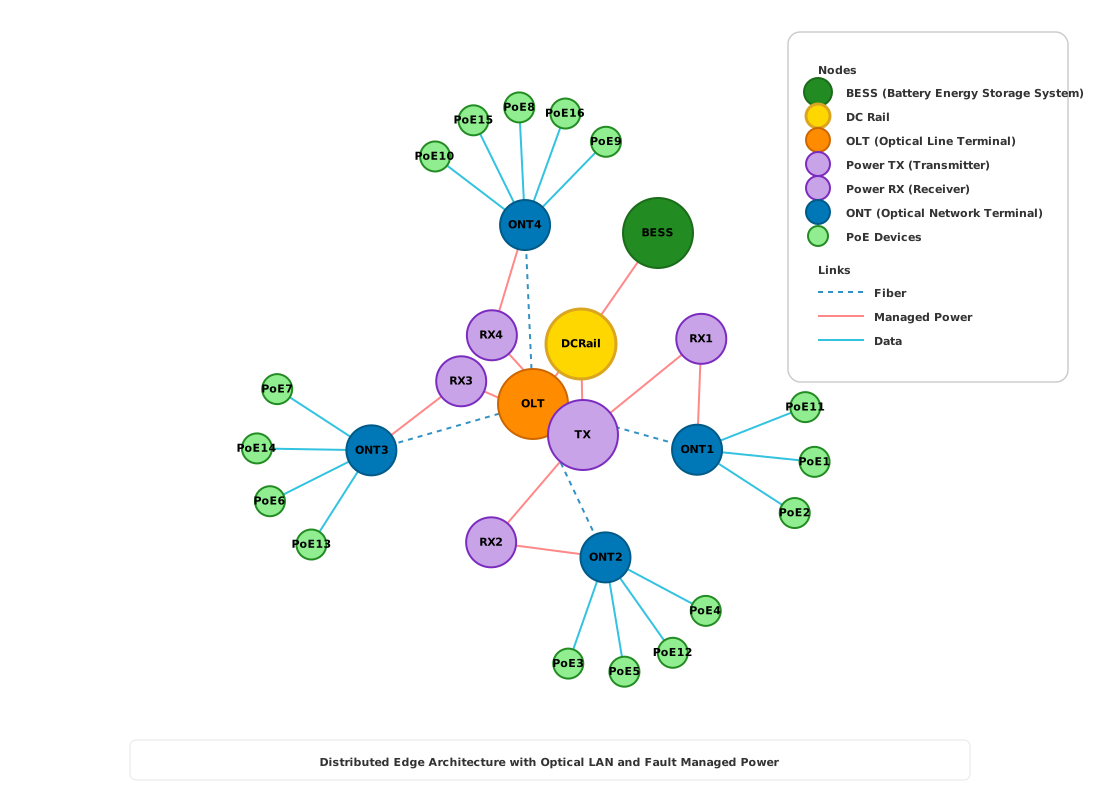
How I’m interpreting the Cisco/Panduit FMPS design
This post is my interpretation of how fault‑managed power systems (FMPS) and Cisco networking can be combined to build resilient distributed edge sites. It’s informed by the Cisco/Panduit implementation guide, but it is not an official summary or restatement of that document. Instead, I’m using their concepts as a reference point and then showing how I translate them into a practical topology for edge campuses, micro‑sites, and optical LAN deployments.
If you need formal requirements, safety limits, and detailed engineering rules, the Cisco/Panduit guide remains the authoritative reference. This post is about how I think through that architecture when I’m planning and explaining distributed edge designs to others.
What the reference guide is trying to solve (in my words)
The Cisco/Panduit FMPS implementation guide focuses on how to safely and predictably deliver power and data over structured cabling, especially across longer distances and in more demanding environments. At a high level, the guide emphasizes:
- Using FMPS to detect and isolate faults quickly, so a problem on one segment doesn’t take down the entire system.
- Designing power segments and cable runs within safe electrical and distance limits.
- Coordinating FMPS hardware with Cisco switching platforms and PoE so that power delivery is intentional, monitored, and policy‑driven.
- Treating power and connectivity together as an engineered system instead of as separate, loosely coupled layers.
My diagram and this post take those themes and apply them specifically to a distributed edge context with an Optical LAN and a ring of power‑managed edge devices.
Walking the diagram: my distributed edge + FMPS view
The SVG at the top of this post is my mental model of a resilient distributed edge site built on the Cisco/Panduit approach.
From the center out:
- Core power + control
- BESS: the battery energy storage system that provides ride‑through and holdover power.
- DC Rail: the local DC distribution point that takes energy from BESS and other sources and fans it out to downstream loads.
- TX: the “transmit” or core switch/router platform that anchors the site’s data plane.
- OLT: the Optical Line Terminal that feeds the Passive Optical Network/Optical LAN.
This “power + connectivity as one stack” approach also has a quiet efficiency payoff. If you can keep more of the site’s energy path in DC (BESS → DC rail → downstream loads), you reduce conversion steps that otherwise waste energy as heat. And on the networking side, Optical LAN architectures can reduce the number of intermediate, always‑on switching layers and telecom rooms—cutting electrical draw and lowering the cooling burden where network gear tends to accumulate.
-
ONT ring (optical distribution)
Each ONT (Optical Network Terminal) terminates fiber segments and presents Ethernet and/or PoE into local pockets of the site. In my drawing, they sit on a ring around the core to make that role visually obvious. -
RX ring (access/aggregation)
RX devices represent downstream access switches or edge routers that aggregate local zones, supply PoE, or bridge between optical and copper domains. They’re shown on a second ring to separate “optical termination” (ONT) from “local aggregation” (RX). -
PoE edge devices
Around the outside are PoE endpoints: cameras, APs, sensors, and other IP devices that draw power and data from the FMPS‑enabled infrastructure. -
Color‑coded links
- Fiber: blue dashed lines, representing PON/Optical LAN connectivity between OLT and ONTs.
- Managed power: red solid lines, representing FMPS‑managed DC power distribution.
- Data: gray lines, representing pure data links (often overlaying the same pathways but logically tracked separately).
This is not meant to be a one‑for‑one copy of any figure in the Cisco/Panduit document. It is how I visualize the roles and relationships that guide describes when I think about a specific edge site.
Design principles I derive from the Cisco/Panduit model
When I read the FMPS implementation guidance and apply it to distributed edge, a few core design principles jump out. Again, these are my distilled takeaways, not direct quotes:
-
Segmentation and fault domains
Break the site into clear power segments and fault domains. A problem on one PoE branch or one FMPS segment should be detectable and isolatable without taking down the whole OLT or all PoE loads. - Priority‑driven power planning
Classify loads by priority:- Keep control‑plane and safety‑critical devices up as long as possible (OLT, core switch, security, life‑safety).
- Plan for graceful shedding of non‑critical loads as battery or power margins shrink.
- Visibility and telemetry first
Treat telemetry as a design requirement, not an afterthought. FMPS controllers, switches, and BESS should all produce the data you need to:- See fault conditions quickly,
- Verify behavior after events, and
- Feed automation.
-
Respect safe distances and limits
The guide is very clear about cable lengths, power budgets, and safety envelopes. My rule of thumb: model those constraints early and visually (as I’ve tried to do in the diagram) so the topology doesn’t quietly violate them. - Treat power and networking as one system
Instead of “electrical” and “IT” teams designing in parallel, the architecture assumes these are co‑designed. FMPS and Cisco platforms are meant to work together, not in isolation.
Applying this to real distributed edge sites
Here are a few ways this architecture shows up in the real world:
- Campus / multi‑building sites
- Central BESS + DC Rail in a main building.
- OLT and core switching in the same secure space.
- ONTs and RX devices fanning out to other buildings or floors with FMPS supplying safe, distance‑appropriate power.
- Remote POPs and micro‑data centers
- Smaller‑scale versions of the same stack, with carefully sized BESS and DC rails.
- Emphasis on unmanned operation and telemetry, because truck rolls are expensive.
- Industrial and utility edges
- FMPS and the Cisco/Panduit model are especially compelling where safety, grounding, and distance constraints are strict.
- The architecture makes it easier to power sensors, cameras, and edge compute nodes in challenging environments.
In each case, the diagram helps me reason about which components must stay online, which can be sacrificed, and how FMPS boundaries should be drawn.
How to use the Cisco/Panduit guide with this diagram
If you’re planning or reviewing a site, here’s how I recommend combining the reference guide with this blog:
-
Start with the official guide
Understand the formal requirements: distances, current limits, safety behavior, and recommended topologies. -
Overlay those rules onto your site
Using your campus / building flooplans, map where your BESS, DC Rails, OLT, TX, ONT, RX, and PoE endpoints actually live in your environment, using a topology representation your team is comfortable with (paper, whiteboard, or existing design tools). -
Use the diagram for “what if” discussions
Walk stakeholders through fault scenarios: “What happens if this segment fails?”
Decide where FMPS should isolate faults and what your priority tiers look like. -
Document decisions in both directions
Keep your local diagrams (like the one in this post) aligned with the language and constraints of the Cisco/Panduit guide so operations and engineering teams can move smoothly between them.
Next steps (my recommended checklist)
- Identify one or two representative edge sites where FMPS + Optical LAN would add the most value.
- Capture a clear topology view for those sites using your preferred tooling (even a simple block diagram is fine).
- Map your loads, power segments, and telemetry points explicitly.
- Cross-check that plan against the Cisco/Panduit FMPS implementation guide.
- Run tabletop exercises for fault and brownout scenarios before deploying.
Further reading
- Cisco/Panduit — FMPS + Cisco implementation guide:
https://www.cisco.com/c/en/us/td/docs/engineering_alliances/panduit_fmps_and_cisco_implementation_guide.pdf